I may earn a commission at no extra cost to you. #ad
Free Guide: How to Audit Your Hardware Wallet Security Settings
Jump to Section
Why You Need a Regular Security Audit
In the world of self-custody, you are your own bank. While hardware wallets like Ledger, Trezor, or BitBox02 provide a high level of security by keeping private keys offline, they are not "set and forget" devices. Security landscapes change, new vulnerabilities are discovered, and your own physical storage habits might slip over time.
A security audit is a systematic review of your device, your backup procedures, and your operational habits. By performing this audit every 6 to 12 months, you ensure that your assets remain protected against both physical theft and sophisticated digital attacks.
Physical Security and Environment Audit
Your hardware wallet's primary defense is its physical isolation. Start your audit by examining the device itself. Look for signs of tampering, such as scratches around the casing seams or any unusual behavior during the boot process. While most modern wallets have secure elements that prevent hardware-level extraction, physical integrity is still your first line of defense.
Consider the following:
- Storage Location: Is your device stored in a location that is both dry and secure? High humidity or extreme temperatures can damage the OLED screens or internal components over several years.
- Accessibility: Who has physical access to the room where your device is kept? If you've moved house or changed roommates recently, your storage strategy needs to be re-evaluated.
- PIN Complexity: Does your PIN still offer sufficient protection? Avoid obvious combinations like "123456" or your birth year. Ensure your device is set to wipe itself after a specific number of failed attempts (usually 3 to 10).
Firmware and Software Integrity
Manufacturers regularly release firmware updates to patch security vulnerabilities and add support for new assets. However, updating firmware carries a small risk, making it a critical part of your audit. Always ensure you have your recovery seed phrase before performing an update.
Verify that you are using the official companion software (like Ledger Live or Trezor Suite). Scammers often create "cloned" apps that look identical but are designed to steal your seed phrase. Check the version number of your software and ensure it was downloaded from the official domain (etherstick.com or the manufacturer's site).
The Seed Phrase and Recovery Audit
The most critical part of your audit is the recovery seed. If your hardware wallet breaks or is lost, the seed phrase is the only way to recover your funds. Conversely, if someone else finds your seed phrase, they have total control over your assets.
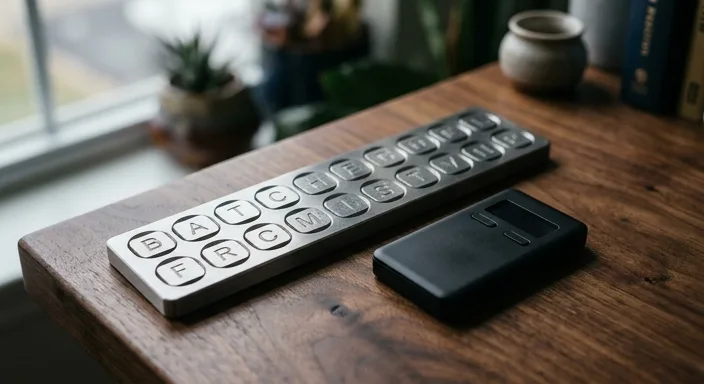
Check the physical condition of your seed phrase backup. Is the paper fading? Is the metal plate scratched? If you are still using a paper backup, consider upgrading to a stainless steel or titanium solution that can survive fire or water damage.
Crucial Step: Perform a Recovery Check. Most hardware wallets have an app or a setting that allows you to "Verify Recovery Phrase." This allows you to enter your phrase into the device (never into a computer) to ensure that the words you have written down actually match the keys stored on the device. This is the ultimate peace of mind.
Advanced Settings: Passphrases and PINs
If you have a significant amount of capital, a standard 24-word seed phrase might not be enough. During your audit, evaluate if it’s time to enable a "Passphrase" (often called a 25th word or hidden wallet).
A passphrase adds an extra layer of security. Even if a thief steals your 24-word seed, they cannot access your funds without the passphrase. This also provides "plausible deniability." You can have a small amount of crypto on your main PIN and the majority of your wealth hidden behind a second PIN linked to your passphrase.
Review your PIN settings as well. Does your device have an auto-lock timer? Set it to a short duration (e.g., 2 minutes) so the device locks itself if you walk away while it's plugged in.
Operational Security and Transaction Signing
How do you interact with your wallet? The most common way people lose money isn't through hardware failure, but through "blind signing" or phishing attacks. Audit your transaction habits:
- Verify on Device: Always, without exception, verify the recipient address and the amount on the hardware wallet screen itself. Never trust the address shown on your computer monitor.
- Disable Blind Signing: If you aren't actively using DeFi protocols or minting NFTs, disable "Blind Signing" in your device settings. This prevents you from accidentally signing a malicious contract that could drain your wallet.
- Limit Permissions: Use tools like Revoke.cash to audit which smart contracts have permission to spend your tokens. A hardware wallet won't protect you if you previously gave a malicious contract "infinite" spending permission.
Privacy and Connectivity Settings
Your hardware wallet protects your keys, but it may leak your privacy. When you use manufacturer-provided software, you are often broadcasting your XPUB (Extended Public Key) to their servers, allowing them to see your entire transaction history and balance.
For a high-level security audit, consider connecting your hardware wallet to your own full node using software like Sparrow Wallet or Electrum. This ensures that no third party knows which addresses belong to you. Additionally, audit your Bluetooth settings (if applicable). While Bluetooth on devices like the Ledger Nano X is encrypted and doesn't expose keys, some users prefer to keep it disabled when not in use to reduce the device's attack surface.
Frequently Asked Questions
We recommend a full audit every 6 months. At a minimum, do it once a year to ensure your backup is intact and your firmware is up to date.
NEVER. Entering your seed phrase into a computer, phone, or any device connected to the internet defeats the entire purpose of a hardware wallet. Only enter your seed phrase into the hardware wallet device itself.
Don't panic, but proceed with caution. Ensure you have your 24-word seed phrase handy before updating. Sometimes, jumping across many versions can trigger a device reset, and you will need the seed to restore your wallet.
Yes. This is a common strategy for redundancy. If you have two devices with the same seed, you have an immediate backup if one fails. Part of your audit should be checking that both devices are working correctly.