Free Guide: The Ultimate Comparison of Ledger vs. Trezor for New Investors
Jump to Section
If you have recently entered the world of cryptocurrency, you have likely heard the phrase, "Not your keys, not your coins." This mantra emphasizes the importance of self-custody. Leaving your digital assets on an exchange like Coinbase or Binance means you don't truly own them; the exchange does. To take full control, you need a hardware wallet.
Two names dominate the hardware wallet market: Ledger and Trezor. Both companies offer world-class security, but they approach the philosophy of "cold storage" in very different ways. This guide will break down the nuances to help you decide which device deserves to hold your life savings.
Understanding Hardware Wallets
Before diving into the comparison, it is vital to understand what these devices actually do. A hardware wallet does not store your "coins"—those live on the blockchain. Instead, the wallet stores your private keys, which are the digital signatures required to authorize transactions.
The "magic" of a hardware wallet is that your private keys never leave the device. Even when you plug it into a computer infected with malware, the sensitive data remains isolated in a "cold" environment, far from the reach of hackers.
Ledger: The Industry Powerhouse
Founded in 2014, Ledger is the most popular hardware wallet manufacturer in the world. Their current lineup includes the Ledger Nano S Plus, the Ledger Nano X, and the premium Ledger Stax.
Ledger devices use a proprietary operating system called BOLOS and rely on a specialized microchip known as a Secure Element (SE). This is the same type of high-security chip used in credit cards and passports, designed specifically to resist physical tampering and side-channel attacks.
The Ledger Live app is the primary interface for Ledger users. It is a sleek, all-in-one desktop and mobile application that allows you to buy, sell, swap, and stake your crypto directly within the ecosystem.
Trezor: The Open-Source Pioneer
Trezor, created by SatoshiLabs in 2013, was the world’s first hardware wallet. Their philosophy is centered on transparency. Unlike Ledger, Trezor's software and hardware designs are fully open-source. Anyone in the world can audit their code to ensure there are no backdoors.
The current lineup features the Trezor Model One, the touchscreen Trezor Model T, and the newly released Trezor Safe 3. The Safe 3 is particularly notable as it introduced a secure element chip to the Trezor lineup, narrowing the hardware gap with Ledger while maintaining an open-source ethos.
Trezor users primarily interact with their devices through Trezor Suite, a clean, privacy-focused application that runs on desktop or via a web browser.
Security Features Comparison
While both brands are incredibly secure, they have different philosophies:
- Closed vs. Open Source: Ledger uses closed-source firmware for its Secure Element, arguing that the "security through obscurity" combined with certified chips is superior. Trezor argues that "security through transparency" is the only way to truly trust a device.
- Physical Attacks: Historically, Ledger's Secure Element made it more resistant to sophisticated physical attacks (where a hacker physically dismantles the device). However, Trezor’s Safe 3 now includes a secure element to prevent "seed extraction" if the device is stolen.
- Passphrase: Both devices support a BIP39 passphrase (sometimes called a "25th word"). This is the ultimate security layer that prevents anyone from accessing your funds even if they steal your 24-word recovery seed and your PIN code.
Supported Assets and Ecosystems
For most new investors, both wallets will support 99% of the coins you want to buy. Bitcoin, Ethereum, Solana, and Cardano are standard on both.
Ledger generally has a wider breadth of native support within the Ledger Live app. They are often faster to integrate new "hot" altcoins. If you are a "degem" or someone who likes to explore experimental tokens, Ledger’s integration with various browser extensions (like MetaMask or Phantom) is exceptionally smooth.
Trezor supports thousands of coins, but some assets require the use of third-party wallets. For example, on the Trezor Model One, you cannot manage XRP or Cardano natively in Trezor Suite; you would need to use a different interface while the Trezor provides the security. The higher-end Model T and Safe 3 have much broader native support.
Design and User Experience
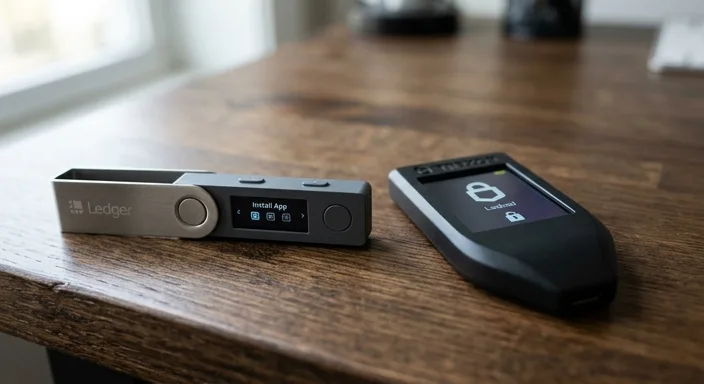
Portability: Ledger devices look like sleek USB thumb drives. The Nano X features Bluetooth, allowing you to manage your portfolio on your iPhone or Android without any cables. This is a massive convenience for people who want to trade on the go.
Interaction: The Trezor Model T features a large color touchscreen, making it much easier to enter PINs and passphrases directly on the device. Ledger Nano devices use two small buttons, which can feel a bit clunky when entering long strings of data.
Screen Size: Trezor generally wins on screen real estate. Ledger screens are functional but small, often requiring you to scroll through long wallet addresses to verify them.
The Final Verdict: Which is Best for You?
Choosing between Ledger and Trezor often comes down to your personal values:
- Choose Ledger if: You want a sleek, mobile-friendly device with Bluetooth, a "one-stop-shop" app (Ledger Live), and support for the widest variety of altcoins natively.
- Choose Trezor if: You value open-source transparency above all else, prefer a larger screen for verifying transactions, and want a device with a long-standing reputation for community trust.
For a complete beginner, the Ledger Nano S Plus or the Trezor Safe 3 are the best value propositions, offering top-tier security for under $80.