I may earn a commission at no extra cost to you. #ad
Free Guide: Troubleshooting Common Portable Security Key Connection Issues
Jump to Section
Identifying Physical Hardware Failures
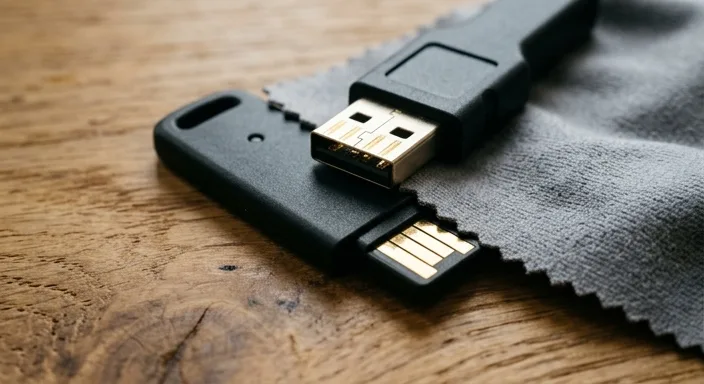
Before diving into complex software configurations, it is essential to rule out physical damage. Portable security keys are designed for durability, often featuring IP68 water resistance and crush-proof designs. However, the gold-plated USB contacts can accumulate oils, dust, or pocket lint over time.
If your key's LED does not light up when inserted, start by inspecting the contacts. Use a microfiber cloth or a cotton swab with a tiny amount of 70% isopropyl alcohol to clean the surface. Furthermore, check the key for any physical warping or cracks near the connector. Even a slight bend can prevent the pins from making full contact with the USB port.
Solving USB Port and Hub Conflicts
Hardware security keys are low-power devices, but they are extremely sensitive to data latency and signal "noise." Many users encounter issues when using unpowered USB hubs or daisy-chained adapters. If your key is plugged into a monitor's USB port or a keyboard pass-through, the system might fail to handshake with the device's secure element.
The Golden Rule: Always test the security key in a direct port on the computer's motherboard or chassis. If you are using a USB-C key with a USB-A adapter, ensure the adapter supports data transfer and isn't just a charging tip. Some low-quality adapters lack the necessary pins for the cryptographic handshake required by FIDO2 and U2F protocols.
Browser and WebAuthn Configuration
Sometimes the hardware is fine, but the software bridge is broken. Modern security keys rely on the WebAuthn API. If you are using an outdated browser or a privacy-focused browser with strict script blocking, the "touch your key" prompt may never appear.
- Incognito Mode: Some browsers disable certain HID (Human Interface Device) permissions in private windows. Try a standard window to see if the issue persists.
- Site Permissions: Ensure the website has permission to access "Security Keys." You can usually find this in the browser settings under
Privacy and Security > Site Settings. - Multiple Keys: If you have multiple keys registered (e.g., a YubiKey and a Google Titan), ensure the browser isn't defaulting to a different "Platform Authenticator" like Windows Hello or Touch ID.
Solving NFC and Mobile Connection Issues
NFC (Near Field Communication) is the primary way portable keys interact with mobile devices. This is often the most frustrating area for users because the "sweet spot" for NFC varies by phone model.
For iPhones, the NFC antenna is located at the very top edge, near the camera assembly. On Android devices, the antenna is typically in the center of the back plate. If your phone isn't vibrating or recognizing the key, try removing your phone case. Thick cases, or those with metal plates for magnetic car mounts, will completely block the NFC signal. Hold the key still against the phone for at least 2-3 seconds; moving it too quickly can interrupt the data exchange.
Updating Drivers and Key Firmware
On Windows 10 and 11, security keys are generally "plug-and-play" as they use the native HID driver. However, older versions of Windows or specific enterprise builds might require the Yubikey Manager or specific manufacturer software to "awaken" the device.
Note that for security reasons, most hardware keys (like YubiKeys) do not allow firmware updates. This prevents attackers from overwriting the secure element. If there is a fundamental bug in the firmware of an older key, the only solution may be a replacement. Always check the manufacturer's "Key Health" utility to verify the device is authentic and functioning internally.
OS-Specific Fixes (Windows, macOS, Linux)
Different operating systems handle security hardware in unique ways:
Windows: Open Device Manager and look under "Keyboards" or "Smart cards." If you see a yellow exclamation mark, right-click and select "Update driver." Sometimes Windows Hello takes over the key; you may need to manage your "Security Key" settings within the Windows Account menu.
macOS: If your Mac has a T2 chip or is an Apple Silicon (M1/M2/M3) model, you might need to "Allow" the accessory to connect via a system prompt. Check System Settings > Privacy & Security and scroll down to "Allow accessories to connect."
Linux: Most distributions require specific udev rules to allow non-root access to the security key. Without these rules, the browser cannot "see" the USB device. You can usually find the correct rules package in your repo, such as libu2f-host or yubikey-personalization.
Frequently Asked Questions
Q: My key works on my laptop but not my phone. Is it broken?
A: Likely not. This points to an NFC positioning issue or a browser compatibility issue on your mobile OS. Ensure you are using Chrome or Safari, as some "in-app" browsers (like the one inside Twitter or Facebook) do not support hardware keys.
Q: Can I use a security key if my USB port is broken?
A: If you have an NFC-enabled key and an NFC-enabled mobile device, you can use it there. For a PC, you would need to use a working USB-C to USB-A adapter or fix the port.
Q: Why does my key stay lit but doesn't do anything when I touch it?
A: This usually means the computer recognizes the device, but the specific website or application hasn't sent the "request" to the key. Refresh the page or re-initiate the login flow.